
Appearance
Generic Settings
Settings that apply to the entire software.
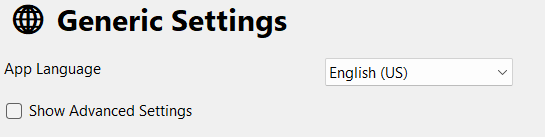
App Language
The language to be used for the LumiFind itself. The default value is set on the Welcome Wizard. This value does not affect the search language. Changing will require restart of the program. Current options are English (US), English (UK), Chinese, Dutch, French, German, Italian, Spanish, Turkish.
Show Advanced Settings
By default, LumiFind is set up for daily users. However, if you would like to fine-tune some settings, you can check this box to display the advanced options. Settings written in italics will be only shown if this option is checked.
Automatically Check for Updates on Startup
LumiFind introduces exciting features with each release, improves the user experience, and sometimes optimizes the analysis. You can always check for updates via Help -> Check for Updates..., but enabling this option will perform the check automatically for you. Note that updates must be downloaded manually; this feature only displays them in the Logs.
Minimize to System Tray on Close
When enabled, closing the main window keeps LumiFind running in the system tray instead of quitting. Use the tray icon to reopen the window or quit LumiFind completely. This option is only shown on platforms that support a system tray icon. Default: No.
Create Backup
You can back up your analysis data if your archive is large, you want to try another model, or you need to move your data to another computer. Use the "Create Backup" button to do this. You can also include image thumbnails if you have the Pro edition. The button lets you choose a folder and filename for the backup ZIP file and shows when the last backup was made.
If your backup is older than one month, you will also be notified. Instructions for restoring a backup are in another section.